Can AI read your website? A designer’s guide to web design for AI search

By Amaan, Design Head at AWebCo
PUBLISHED 5 NOVEMBER 2026
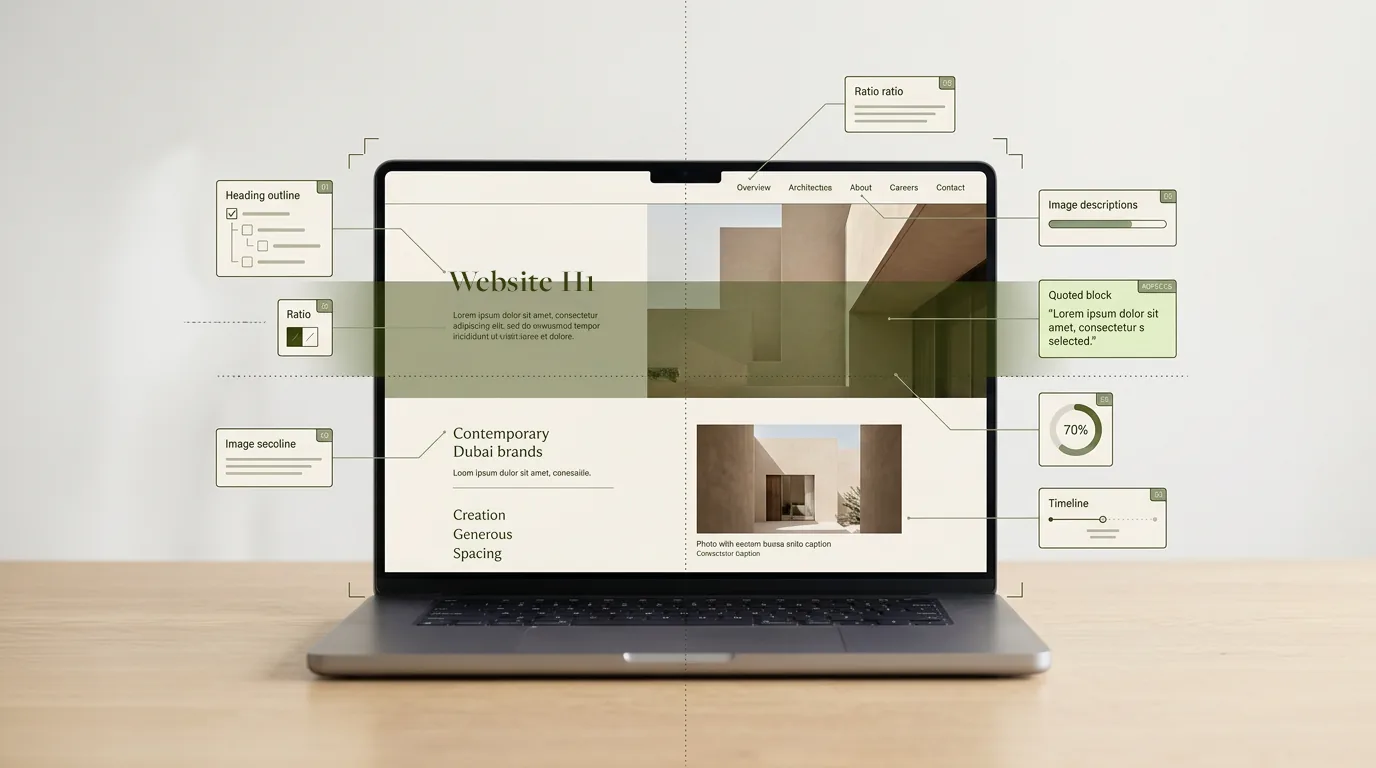
QUICK ANSWER
An AI assistant can read your website when the structure of each page matches the meaning of its content: one clear H1, headings phrased as questions, a short answer near the top, real text rather than text inside images, and pictures with descriptive alt text. Those are design decisions, and they are the same ones that make a page easy for a person to read.
That is the whole argument of this article. For twenty years, designers worked for one reader: a human with a screen. Now there are three, and two of them are machines. They all want the same thing.
At AWebCo, we design and build websites for businesses across the UAE, and we help them get named in AI search. Our earlier article on SEO vs GEO explained why being in an AI answer matters. This one is about the design work that makes it possible.
How do AI assistants actually read a web page?
They retrieve it, read it quickly, and lift out the parts that answer the question. Google describes the process openly: AI Overviews and AI Mode use retrieval-augmented generation, pulling pages from the ordinary Search index and reviewing the specific information on them to write an answer with links to its sources.
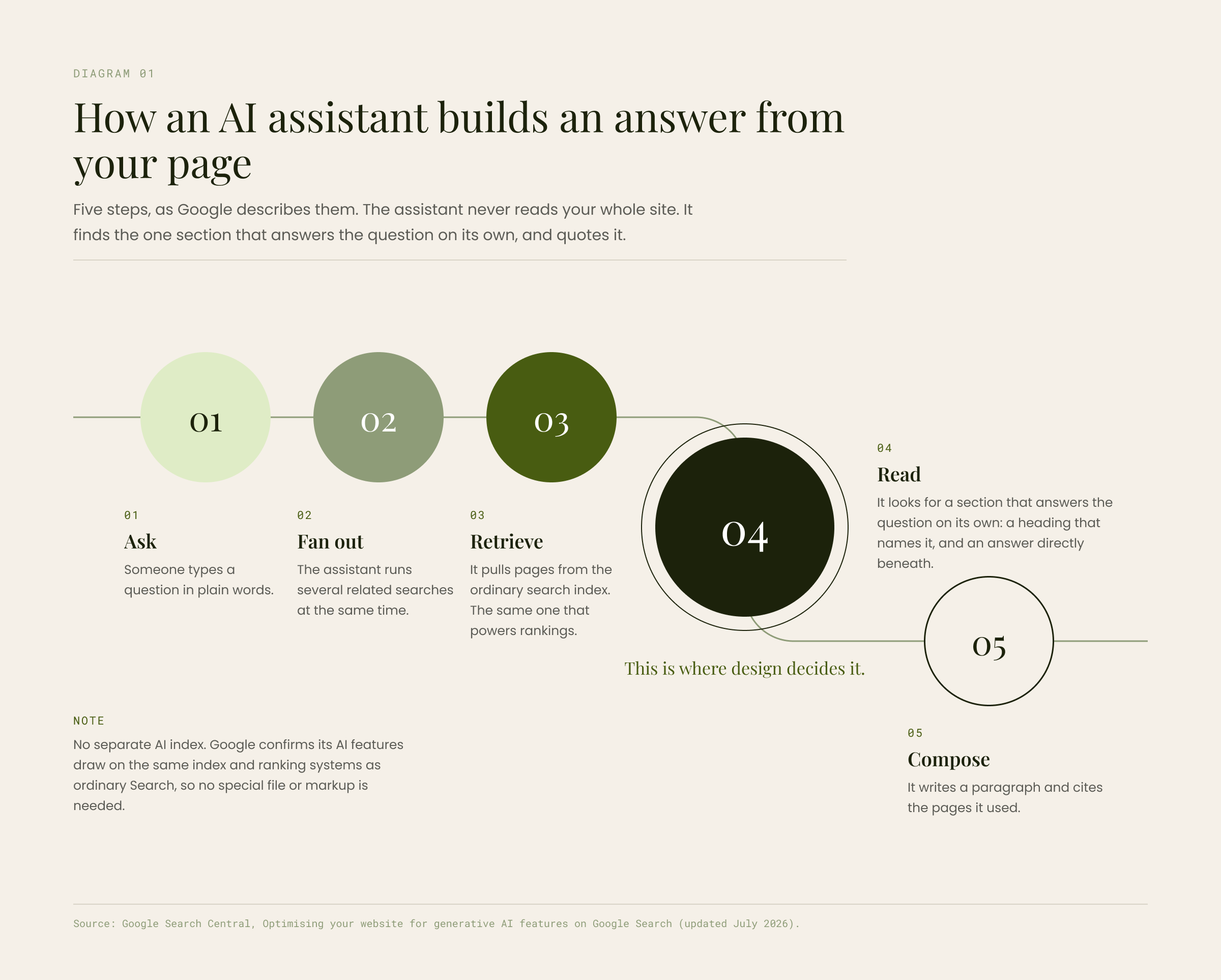
Diagram 01
How an AI assistant builds an answer from your page. Five steps, as Google describes them. The assistant never reads your whole site. It finds the one section that answers the question on its own, and quotes it.
- 01 Ask:
- Someone types a question in plain words.
- 02 Fan out:
- The assistant runs several related searches at the same time.
- 03 Retrieve:
- It pulls pages from the ordinary search index. The same one that powers rankings.
- 04 Read:
- It looks for a section that answers the question on its own: a heading that names it, and an answer directly beneath. This is where design decides it.
- 05 Compose:
- It writes a paragraph and cites the pages it used.
No separate AI index. Google confirms its AI features draw on the same index and ranking systems as ordinary Search, so no special file or markup is needed.
Source: Google Search Central, Optimising your website for generative AI features on Google Search (updated July 2026).
The same guide notes that browser agents read a page in three layers: the visual rendering, which is what a person sees; the DOM, which is the code behind the page; and the accessibility tree, which is the version a screen reader hears. Google's engineers have also published practical guidance on building pages agents can use. In plain terms, an AI reads your page partly as a person sees it and partly as a screen reader hears it.
Those two readers are well understood. Eye-tracking research going back to 1997 shows that people scan web pages rather than read them. On an average visit they read only 20 to 28 per cent of the words, moving between headings in what Nielsen Norman Group calls the layer-cake pattern.
Screen reader users work the same way. Seven in ten navigate a long page by its headings first, which is why the W3C treats headings as the page’s table of contents. Design well for those two readers, and the third is already taken care of.
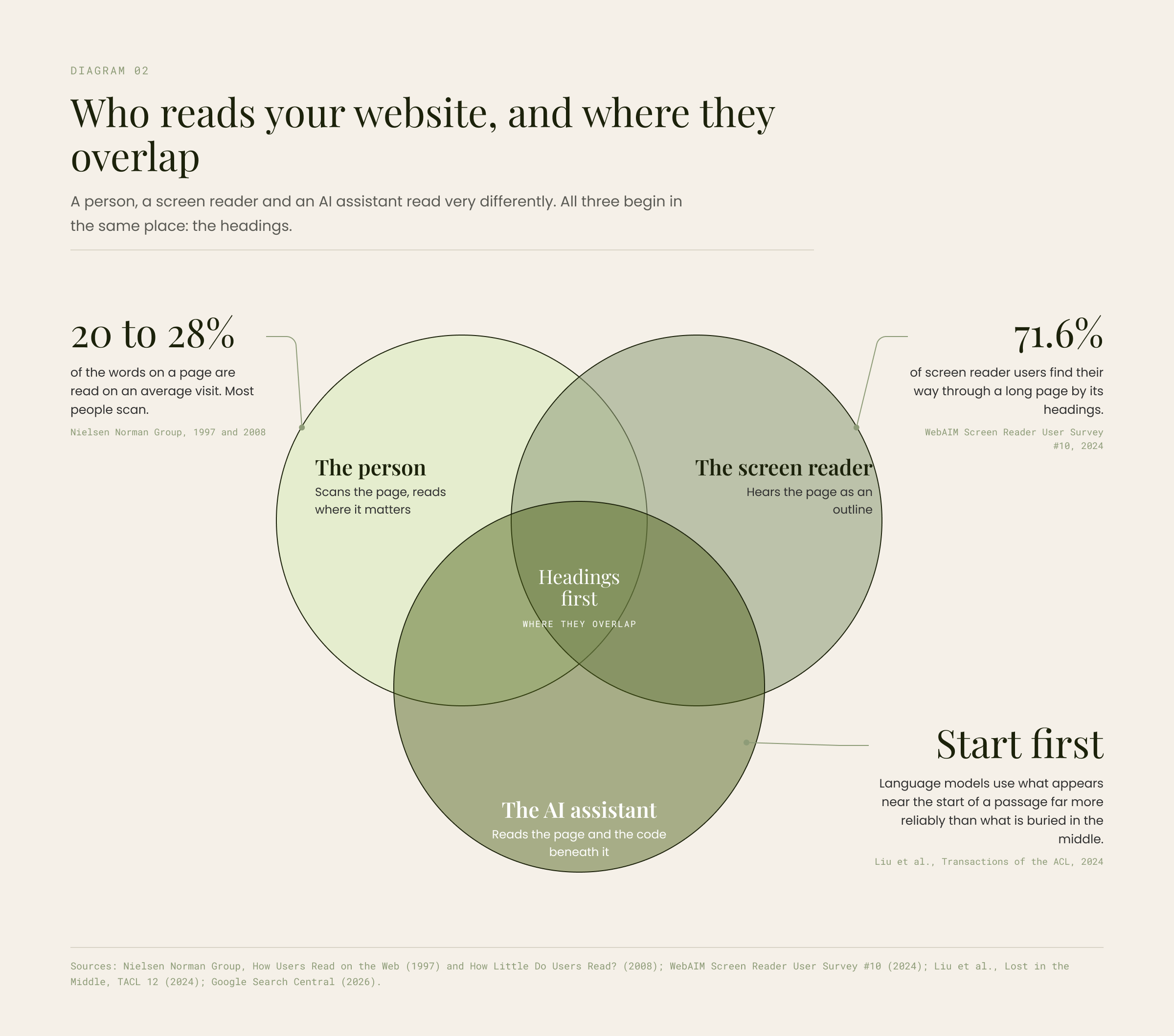
Diagram 02
Who reads your website, and where they overlap. A person, a screen reader and an AI assistant read very differently. All three begin in the same place: the headings.
- The person:
- Scans the page, reads where it matters. 20 to 28% of the words on a page are read on an average visit. Most people scan. (Nielsen Norman Group, 1997 and 2008)
- The screen reader:
- Hears the page as an outline. 71.6% of screen reader users find their way through a long page by its headings. (WebAIM Screen Reader User Survey #10, 2024)
- The AI assistant:
- Reads the page and the code beneath it. Start first: language models use what appears near the start of a passage far more reliably than what is buried in the middle. (Liu et al., Transactions of the ACL, 2024)
- Where they overlap:
- Headings first.
Sources: Nielsen Norman Group, How Users Read on the Web (1997) and How Little Do Users Read? (2008); WebAIM Screen Reader User Survey #10 (2024); Liu et al., Lost in the Middle, TACL 12 (2024); Google Search Central (2026).
Why is my website not showing up in ChatGPT or AI Overviews?
Usually because the page cannot be quoted. An AI answer is a paragraph, and parts of pages now compete to be inside it. If your answer only makes sense after three other paragraphs, sits inside an image, or appears on hover, the assistant moves on to a competitor whose page made it easy.
Google adds a mechanism it calls query fan-out: the model runs several related searches at once to build a fuller answer. A page with distinct, well-labelled sections can satisfy more than one of them. A page that is one long, unbroken argument usually satisfies none. And because the pages it draws from are the pages that rank, the ordinary SEO work of getting indexed and trusted still comes first.
Position matters too. Language models handle information near the start of a passage far better than information buried in the middle, which is a good technical reason to put the answer first and the explanation after it. People reward the same habit. Content that is easier to process is judged more favourably, before anyone has weighed what it says.
Two problems account for most of what we see on Dubai websites. The first is text inside images: headlines rendered as graphics, service descriptions baked into banners. It photographs beautifully and reads as silence, and Google's image guidance is direct that text in images cannot be read or indexed. The second is headings that are styled but not tagged. The page looks organised, but the outline underneath is empty, so the person scans happily while the screen reader and the assistant see one undifferentiated block.
How do I make my website AI friendly?
Treat structure as a design decision rather than a technical layer added afterwards. It is how we approach every website we design, and the table below shows why: every row helps a person first, and the machine benefit follows from it.
| Design decision | What it does for people | What it does for AI |
|---|---|---|
| One H1, question-led H2s | Lets the eye jump to the right section | Gives the assistant a labelled outline to match against the question |
| A short answer near the top | Delivers the point in ten seconds | Provides a paragraph that can be quoted on its own |
| One idea per section | Reduces re-reading | Keeps the lifted passage coherent |
| Real text, not text in images | Can be selected, zoomed, translated and read aloud | Can be indexed and quoted; text in an image is invisible |
| Proper lists and tables | Makes comparisons easy to scan | Preserves the relationships between items |
| Alt text and captions | Explains images to people who cannot see them | Tells the assistant what the image shows |
| Contrast and type size | Readable on a phone in daylight | Passes the WCAG 4.5:1 minimum that accessibility checks look for |
| Main content kept separate | Shows where the real page starts | Google asks that main content be easy to distinguish from navigation and promotion |
If you only do three things, do these: set every headline and service description as real text, tag every heading as a heading, and put a two-sentence answer at the top of each important page.
Does my website need an llms.txt file?
Not for Google. Its guidance states that Google Search ignores llms.txt files and does not require any AI-specific markup or Markdown. Some other services may read them, so keeping one does no harm, but it will not fix a page that cannot be read. Structured data such as Article and FAQPage remains worthwhile for rich results. The gains that matter come from the page itself.
Will designing for AI make my website boring?
No. Think of two layers. Structure is the stage: the outline, the hierarchy, the labelled sections, the real text. Your brand is the performance on it: typography with character, a confident colour system, photography with a point of view, motion that rewards attention. The stage is invisible when it works. The performance is what people remember. The most ambitious work comes from a system, which is the case we made in our guide to brand guidelines, and it is why our content team writes to the structure before anyone opens a design file.
My own research at Syracuse University, designing a board game system for social wellness, taught me the same thing from another angle. When the structure of an experience carries the load, people stop working to understand it and start taking part. A web page is no different.
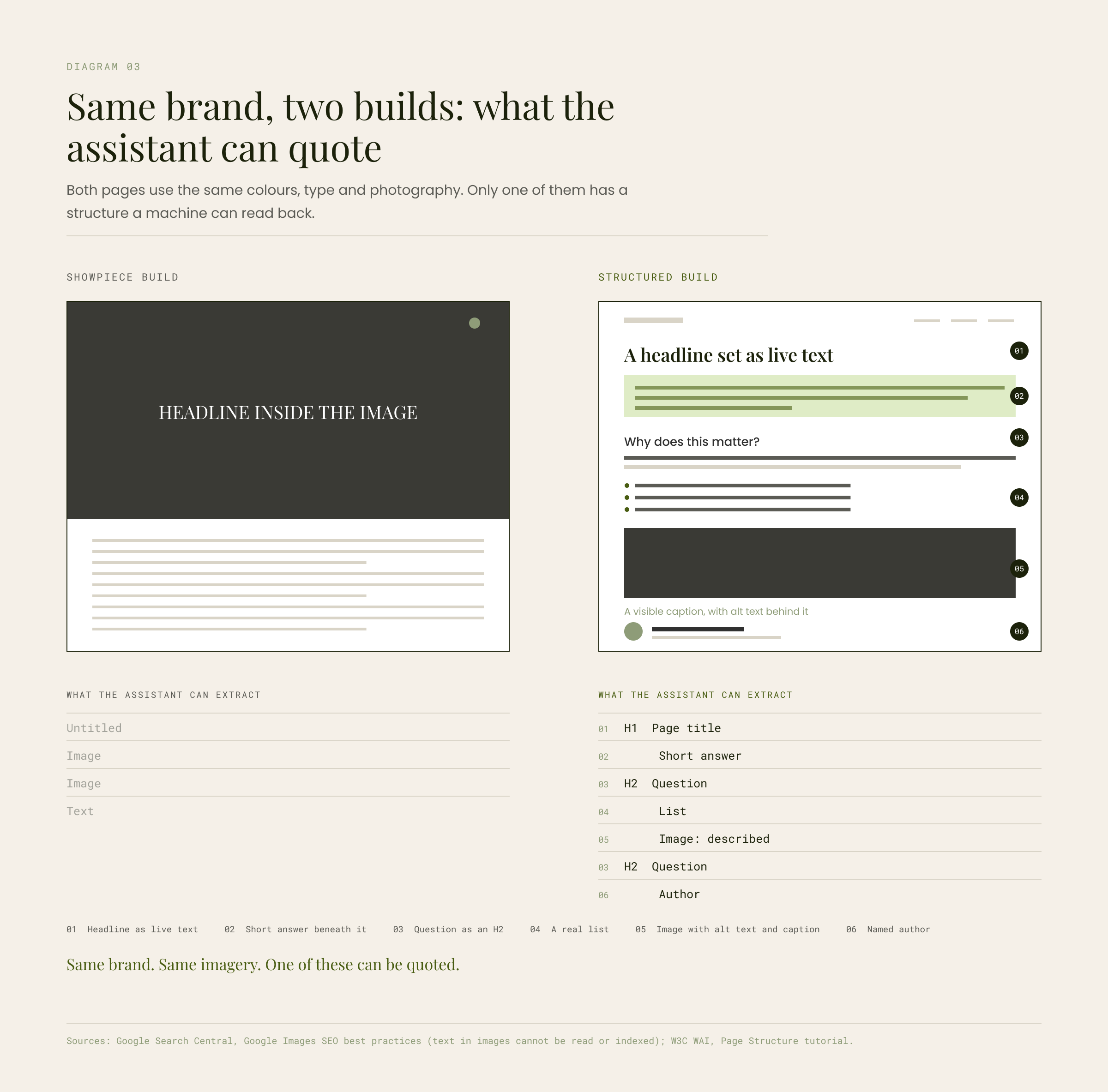
Diagram 03
Same brand, two builds: what the assistant can quote. Both pages use the same colours, type and photography. Only one of them has a structure a machine can read back.
- Showpiece build:
- Headline inside the image. What the assistant can extract: Untitled. Image. Image. Text.
- Structured build:
- 01 Headline as live text. 02 Short answer beneath it. 03 Question as an H2. 04 A real list. 05 Image with alt text and caption. 06 Named author. What the assistant can extract: H1 Page title, Short answer, H2 Question, List, Image: described, H2 Question, Author.
Same brand. Same imagery. One of these can be quoted.
Sources: Google Search Central, Google Images SEO best practices (text in images cannot be read or indexed); W3C WAI, Page Structure tutorial.
How do I check whether AI can read my website?
You do not need a specialist tool. An afternoon and a browser will tell you most of it.
- 01
Read the heading outline. Use a browser extension or the W3C Easy Checks to list a page’s headings. If it reads like a sensible table of contents, you are in good shape.
- 02
Switch to reader mode. It strips the design and shows what a machine sees. If your key messages vanish, they were in images or hidden states.
- 03
Check every image has alt text that says what it shows, in plain language. Decorative images can be marked as such.
- 04
Test contrast and type size on a phone, outdoors. Pale grey on white passes on a studio monitor and fails in the car park.
- 05
Confirm the main content stands apart from navigation, banners and promotions, visually and in the code.
- 06
Open the Generative AI performance report in Search Console. Google now reports how your pages appear in AI Overviews and AI Mode and lets you confirm your site is included.
- 07
Ask the assistants directly. Put the questions your customers ask to ChatGPT, Gemini and Perplexity, and note who gets named. That is your baseline.
Does good design still matter?
More than before. AI assistants are not a reason to redesign a website around machines. They are a reason to finish the job good design always set out to do: make the page clear enough that anyone, or anything, can read it. The businesses that do this now will be the ones assistants quote for years, because the work does not go out of date.
Questions we get asked
Can AI read my website?
Yes, if the page is indexed and its content is real text with a clear heading structure. AI assistants read the text layer of a page, the DOM and the accessibility tree. Text inside images, content that appears only on hover, and headings that are styled but not tagged are largely invisible to them.
Does ChatGPT read websites?
When browsing or searching is enabled, yes. It retrieves pages, reads them and quotes or summarises what it finds, often with a link. The same applies to Gemini, Perplexity and Google AI Overviews. What gets quoted is the part of the page that stands alone and answers the question.
How do I get my website to show up in AI Overviews?
Make sure the page is indexed and included in Search Console's generative AI features, then give it a quotable answer near the top, question-led headings, real text and descriptive images. Google confirms that AI Overviews draw on the same index as ordinary Search, so ordinary SEO fundamentals are the route in.
Does website accessibility help AI search?
In practice, yes. AI agents read pages partly through the structures assistive technology uses: the heading outline, landmarks, alt text and the accessibility tree. A page that works for a screen reader is most of the way to working for an assistant.
Can AI read text in images?
Treat the answer as no. Google's image guidance says text in images cannot be read or indexed. Keep the imagery, but set headlines, service descriptions and calls to action as real HTML text.

Does your website read as silence?
If your site looks good but AI assistants never seem to find it, we are happy to run the seven checks with you and show you what they see. It is a useful thing to know, whatever you decide to do next. We design and build websites and e-commerce stores with structure built in from the first wireframe, and we can show you where you stand in AI search.
Talk to usAmaan
Design Head at AWebCo
Amaan is a digital and product designer and design researcher. He holds a Master’s degree in Design from Syracuse University, where his thesis applied design research to the structure of social experiences. At AWebCo he leads brand, web and content design for clients across the UAE, and writes here about how design shapes the way people and machines read.
Amaan on LinkedIn